
In short: to start budgeting, give it one month and five steps. Add the accounts your money moves through, keep the default categories, set two budgets - one for everything and one for the spending you already suspect - schedule your fixed bills, and spend fifteen minutes reviewing the month at the end. Then change one thing.
Most budgets fail in the first month, and rarely because the maths was wrong. They fail because the setup took a whole weekend, the categories never quite fit, and by the third week nobody wanted to open the app anymore.
So this guide aims lower, on purpose. One month. Five steps. A setup you can finish in an evening and a review you can finish over a coffee. The examples use Qesto, because that is what I build, but the steps work in any budgeting app - or in a spreadsheet, if you are patient.
We will follow one example household all the way through: take-home pay of 8,000 EUR a month, rent of 2,500 EUR, a car, a couple of subscriptions, and no idea where the rest goes. That last part is normal. Finding out is the point of month one. The numbers are in euros; the method works in any currency.
Step 1: Add the accounts your money actually moves through
Start with the accounts you touch every week, not every account you own. For most people that is three:
- the checking account your salary lands in,
- a credit card or cash - whichever you actually pay with day to day,
- a savings account, if money moves into it every month.
In Qesto each account has a name, a currency and an optional type - “Checking account”, “Credit account”, “Savings account”, “Cash” and a few more. The currency is set per account, so a USD account can sit next to your EUR one without any conversion tricks.
An account’s balance is always worked out from its transactions, so there is no starting balance to type in. If you begin from today and the number doesn’t match your bank, open the account and use Correct the balance: enter what the account really held on a given day, and the difference is recorded for you. You are now in sync, and everything after that day adds up on its own.
If you would rather bring your history in, the Import page reads CSV exports from banks and from BudgetBakers Wallet: you map the columns, match accounts and categories, and preview everything before it is saved. There is no live bank connection, so from here on transactions come from you or from the next import.
Don’t chase old history in month one. Today’s balance plus this month’s spending is enough.
Step 2: Keep the categories simple
Qesto starts you with a ready-made category tree: groups like Food & Drinks, Housing, Vehicle and Life & Entertainment, with categories such as Rent, Fuel or Hobbies inside them. Resist the urge to redesign it before you have used it.
For the first month, three rules are enough:
- Use the categories as they are until one of them genuinely doesn’t fit.
- Rename rather than add. If “Hobbies” is really “Climbing”, rename it - the tree nests up to three levels, but a deep tree is a chore to fill in.
- Use labels for things that cut across categories. A trip touches food, transport and lodging; tag all of it Vacation instead of creating a “Trip” category. Family, Vacation and Emergency are there from the start, and labels work in every report.
The goal is that you can pick a category in two seconds while standing at a till. If you hesitate, the tree is too detailed.
Step 3: Set two budgets, not twenty
A budget in Qesto is a spending limit for a period, scoped to the categories and accounts it should track. The temptation is to set one for every category. Don’t - you have no idea yet what “normal” looks like for most of them.
Set two:
- One for everything. An overall monthly budget across all categories - say 4,000 EUR for everything that isn’t rent or a fixed bill. This is your one number for the month.
- One for the thing you already suspect. For most people that is groceries or eating out. Pick whichever you’d least like to see on a bank statement, and set a limit you believe, not the one you wish for: if you think you spend around 300 EUR eating out, start at 300, not 150.
Each budget card shows what you have spent, the limit, the percentage used and what’s left. The bar turns amber at 70%, orange at 90% and red once you go over, so a glance on day 20 tells you whether the last ten days need to be quieter.
You may have read about the 50/30/20 rule: half your pay on needs, 30% on wants, 20% on savings. It is a fine target, but it asks you to sort every purchase into a bucket before you know your numbers. Two budgets ask much less, and month one is about learning the numbers.
Budgets can also run weekly - handy for cash pocket money - or yearly, or for a one-off stretch such as a holiday. For month one, monthly is plenty.
Step 4: Put your fixed payments on autopilot
Rent, phone, insurance, subscriptions, the salary itself: these are known in advance, so type them once and let them post themselves.
In Qesto they live under Planned. Each one is a recurring rule - “Every month”, “Every 2 weeks”, “Every year” - with an amount, an account and, usually, a category. By default a rule posts to your account on its date. If you’d rather check each one first - a utility bill that changes every month, say - switch Post automatically off, and each occurrence waits for you to confirm or skip it.
Start with the three that matter most. For our example household, month one looks like this:
| Payment | Repeats | Amount |
|---|---|---|
| Salary | Every month | +8,000 EUR |
| Rent | Every month | −2,500 EUR |
| Car insurance | Every year | −600 EUR |
The free plan holds three rules, which covers the big ones; Premium removes the cap. The phone bill and streaming can wait for month two, or go in by hand when they arrive.
The Upcoming list then shows what is due over the next 30 days (or 60, or 90), grouped by date, so the rent never surprises you on the 1st. After two or three months of transactions, a Suggested tab appears and points out payments that look recurring but have no rule yet.
The quiet win here is honesty. Once fixed costs are scheduled, the money that is left is money you can actually decide about.
Step 5: The 15-minute month-end review
On the first weekend of the new month, open the Dashboard, step the period back to last month, and set a timer for fifteen minutes. Four questions:
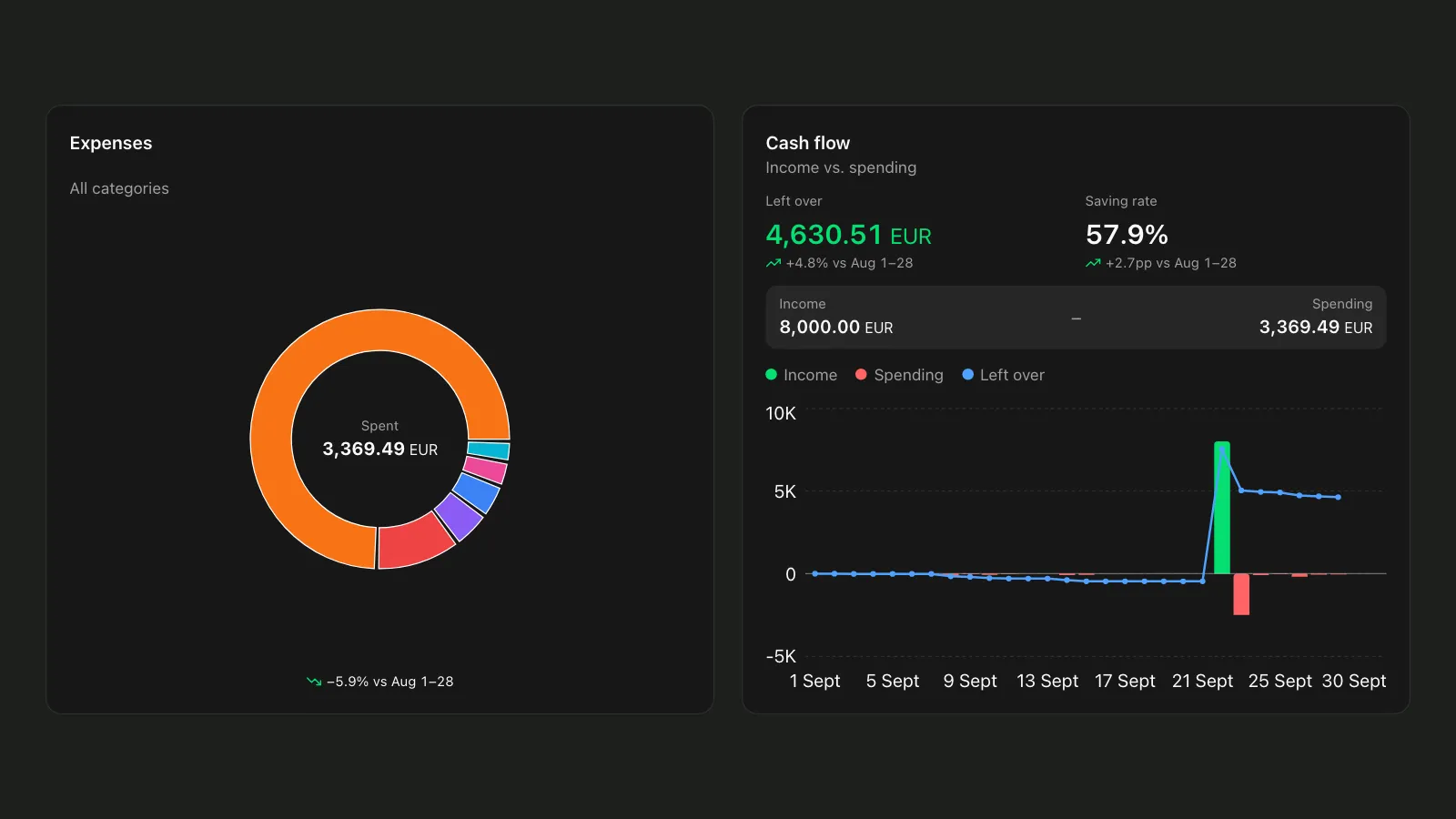
- Where did it go? The Expenses chart splits spending by category - or by label, with one tap. Look at the three biggest slices. One of them will surprise you; that’s the whole point of month one.
- Did more come in than went out? Cash flow shows income against spending, along with your Saving rate. Positive is good. Negative is information, not failure.
- How did the two budgets do? Under, over, or close? Over is fine in month one - it means the limit was a guess, and now you have a real number.
- What changed? From month two, each figure shows the change against the month before - “vs August”, say. A category that jumped by 40% deserves one sentence of explanation, even if it is only in your head.
Then make one change for next month. Only one: raise the eating-out limit to what it really is, add a budget for the category that surprised you, or schedule the subscription you forgot. Small changes stick; a full redesign on the first of the month is how budgets end in the third week.
Common first-month mistakes
- Setting the limit you wish for. A budget you break on day ten teaches you nothing. Start from what you think you spend now.
- Forgetting the yearly bills. Car insurance, a domain, an annual subscription: schedule them in month one, or month eight takes the hit.
- Logging everything except cash. Small cash payments add up fast. A weekly cash budget makes them visible.
- Quitting after the first overspend. Month one is a draft. An overspent budget is the most useful number it gives you.
- Redesigning the categories on day one. Use them for a month first, then rename what doesn’t fit.
What month two looks like
Month two is easier, because now you’re comparing against real numbers instead of guesses. Keep the same two budgets, add at most one more, and keep the fifteen-minute review. By month three the question stops being “where did it go?” and becomes “what do I want it to do?” - which is the question a budget was for all along.
FAQ
How long does it take for a budget to work?
Give it three months. Month one shows where the money goes, month two tests limits based on real numbers, and by month three the budget mostly runs itself.
What if I go over a budget?
Nothing breaks. The bar turns red and shows how far over you are. Use that number as next month’s limit, or decide what to cut.
Should I use the 50/30/20 rule or zero-based budgeting?
Either works once you know your numbers. Zero-based budgeting gives every euro a job before you spend it; 50/30/20 splits your pay into needs, wants and savings. In month one, two budgets and a monthly review teach you more with far less setup.
Do I need to connect my bank?
No. Qesto has no bank connection: you add transactions by hand or import a CSV from your bank.
If you’d like to try this with Qesto, every feature in this guide is on the free plan, and the free plan never expires.